 GEXfocus
Custom indicators for TradingView.
Scripts developed by GEXfocus to concentrate more analysis into fewer slots, with a practical approach and compatibility with free TradingView accounts.
Compatibility
Designed to work even on free TradingView plans.
Optimization
More functions per slot to reduce the classic indicator limit.
Access
One access unlocks Multi-Indicator, Dual Reversal, IRT and Portfolio.
Gamma keys
Keys copied from the web dashboard or app for automatic level plotting in TradingView.
Why they are different
Technical analysis used more efficiently inside TradingView.
GEXfocus scripts are built to concentrate more useful tools into fewer spaces, while keeping a practical structure oriented to real trading sessions.
TradingView limits the number of indicators available depending on the type of account. That is why these scripts are not designed as isolated tools, but as a way to maximize every slot and concentrate operational logic into a more efficient environment.
The goal is not just to add more signals, but to combine technical structure, filters and automation in a more ordered way. That allows the trader to keep more context without filling the chart with multiple separate scripts.
Several of these developments also include elements that are difficult to replicate with generic scripts, such as integration with daily Gamma keys, internal filters or portfolio tracking directly inside the TradingView environment.
More value per slot
The Multi-Indicator concentrates more than 15 functions into a single TradingView slot, reducing the typical friction of free plans.
Integrated Gamma keys
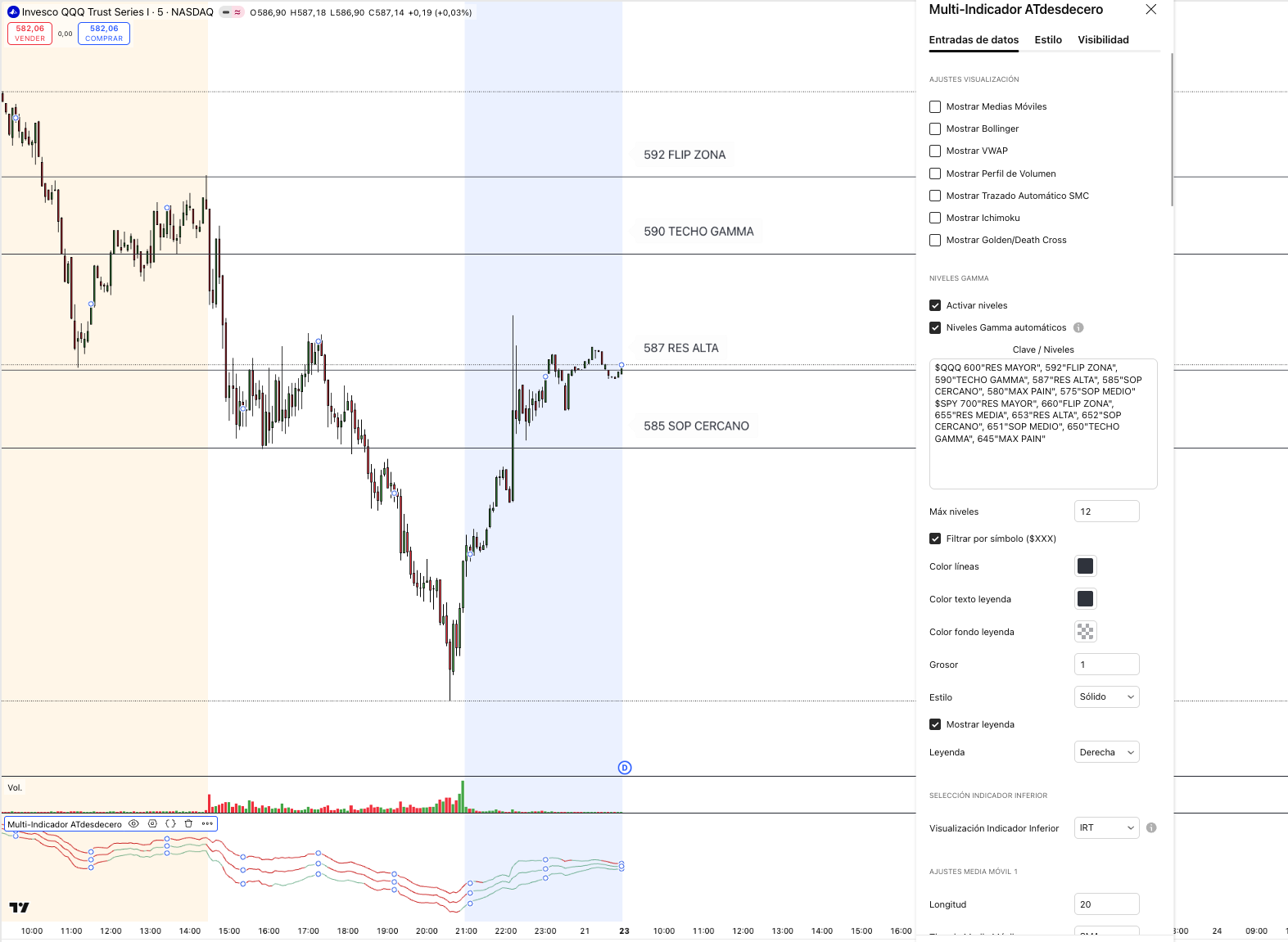
The web dashboard and app show keys for QQQ, SPY, SPX and NDX. Copy the current key and paste it into the Multi-Indicator settings to plot the levels on the chart.
Simple activation
After subscribing, you register your TradingView username in the app and receive the confirmation email with access to the scripts.
Available scripts
Four indicators under the same access.
Each script covers a specific dimension of analysis. Together, they are meant to provide more structure, more tracking and better use of the TradingView environment.
GEXfocus Multi-Indicator
15+ functions · One TradingView slot
It concentrates more than 15 analysis tools into a single slot. It also lets you paste Gamma keys copied from GEXfocus to plot daily levels for QQQ, SPY, SPX and NDX directly on the chart.
- More than 15 integrated functions inside one script
- Especially useful for free accounts or limited indicator slots
- Gamma keys for QQQ, SPY, SPX and NDX from the web dashboard or app
- Included within GEXfocus indicator access
Keys update 3 times per day during spot market hours. TradingView does not allow a direct integration, so you need to copy the current key and paste it manually into the indicator settings.
GEXfocus Dual Reversal
Support and resistance · Reversal alerts
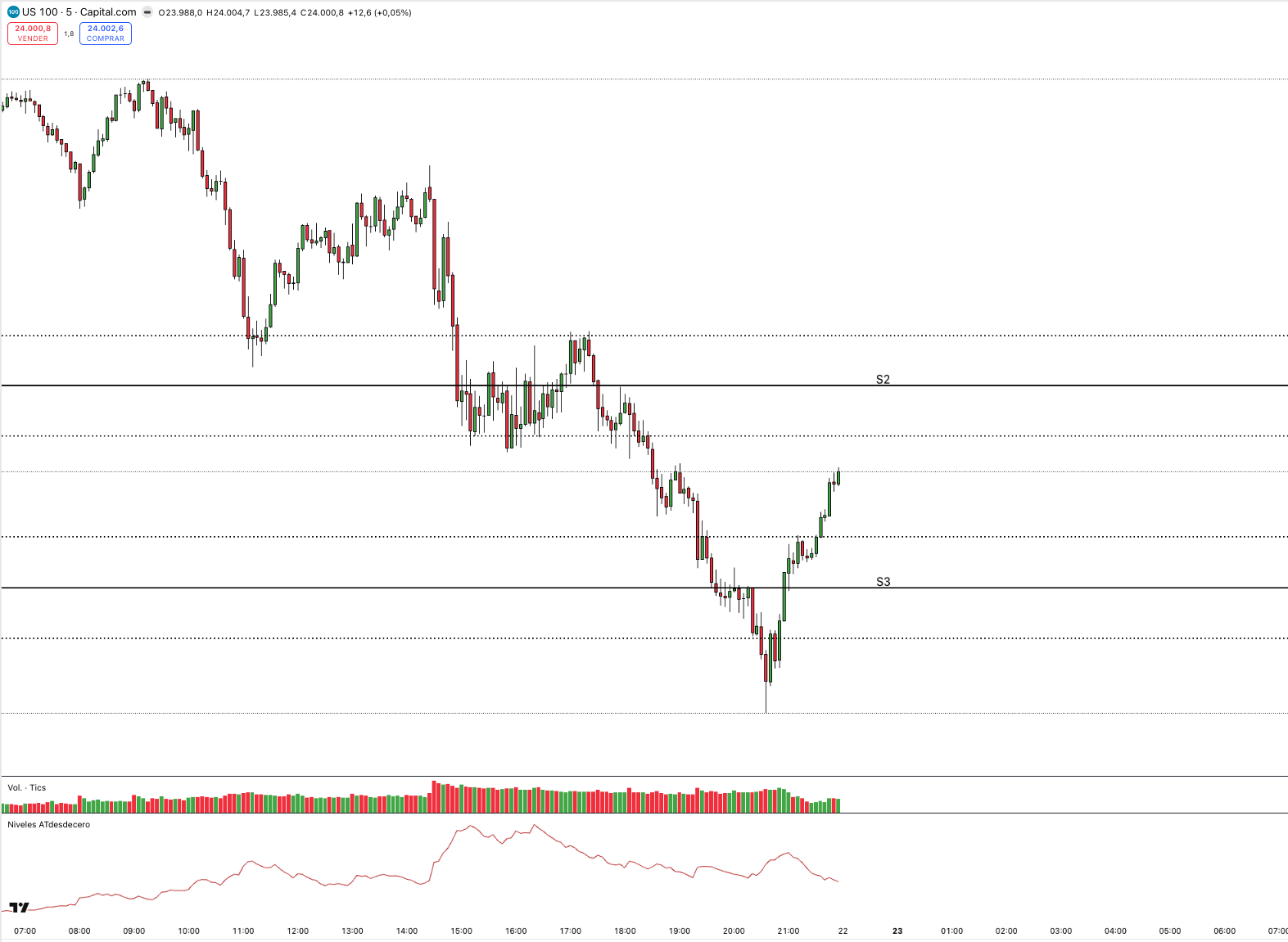
It automatically calculates and plots support and resistance levels using prior daily and weekly closes as reference. It integrates extension logic and filters for a more useful reading of price behavior.
- Automatic plotting of daily and weekly levels
- Projection of three extensions per timeframe
- Dynamic adjustment with a combined VWAP and IRT filter
- Configurable reversal alerts
- Additional tools integrated within the same script
IRT Alert (IRT 2.0)
Three moving averages · Bullish and bearish reversal
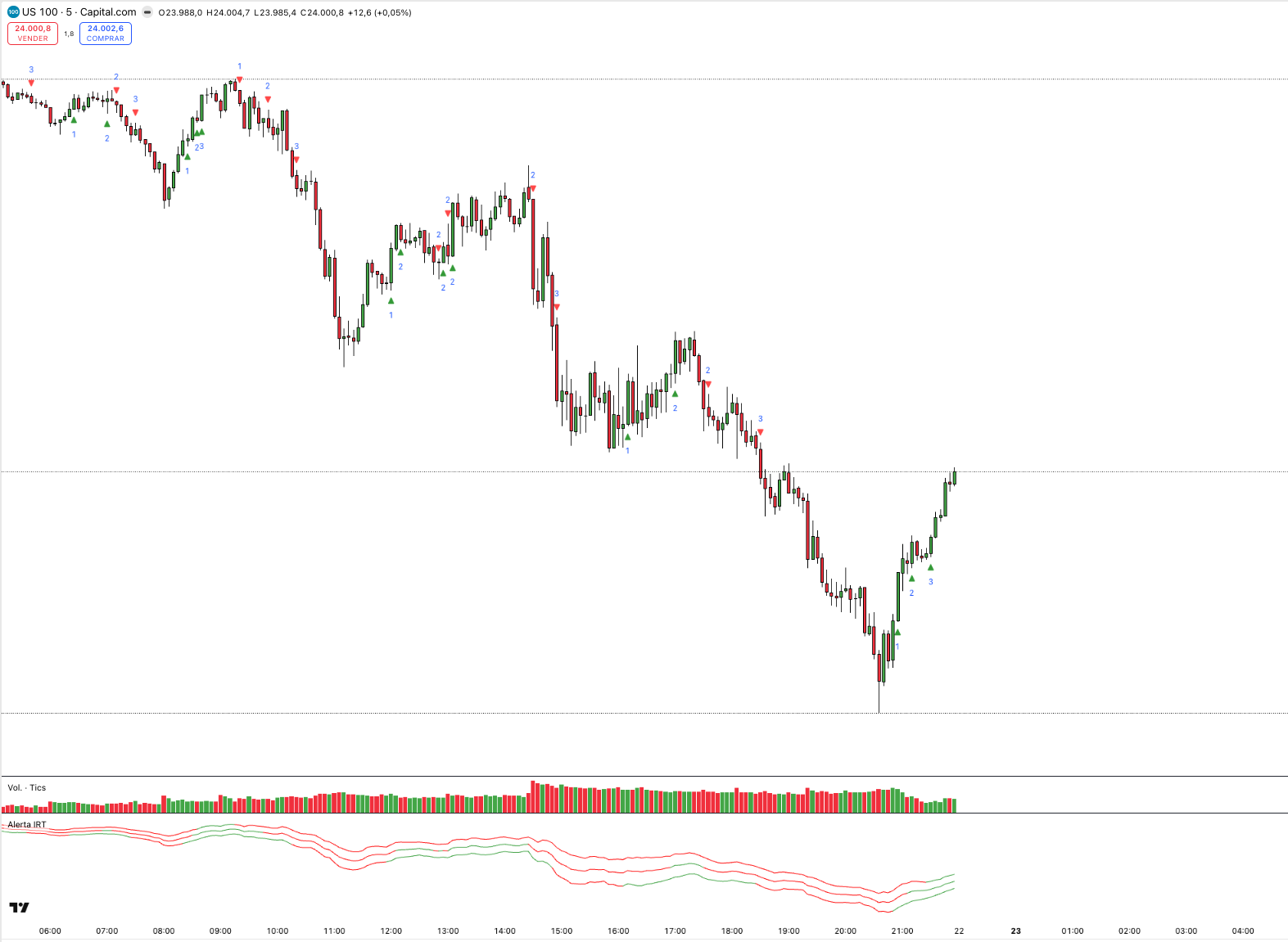
A reactive indicator built around three moving averages that change behavior in response to potential bullish and bearish impulses. It also helps read volatility compression or expansion through the distance between lines.
- Upper moving average oriented to bearish reversal
- Central moving average as a reference to filter false entries
- Lower moving average oriented to bullish reversal
- Volatility reading through the distance between the three averages
- Adjustable parameters for the trader
Its goal is to anticipate reversal impulses. Final price direction still depends on the trader’s own analysis.
GEXfocus Portfolio
Portfolio tracking · Up to 10 assets · Real time
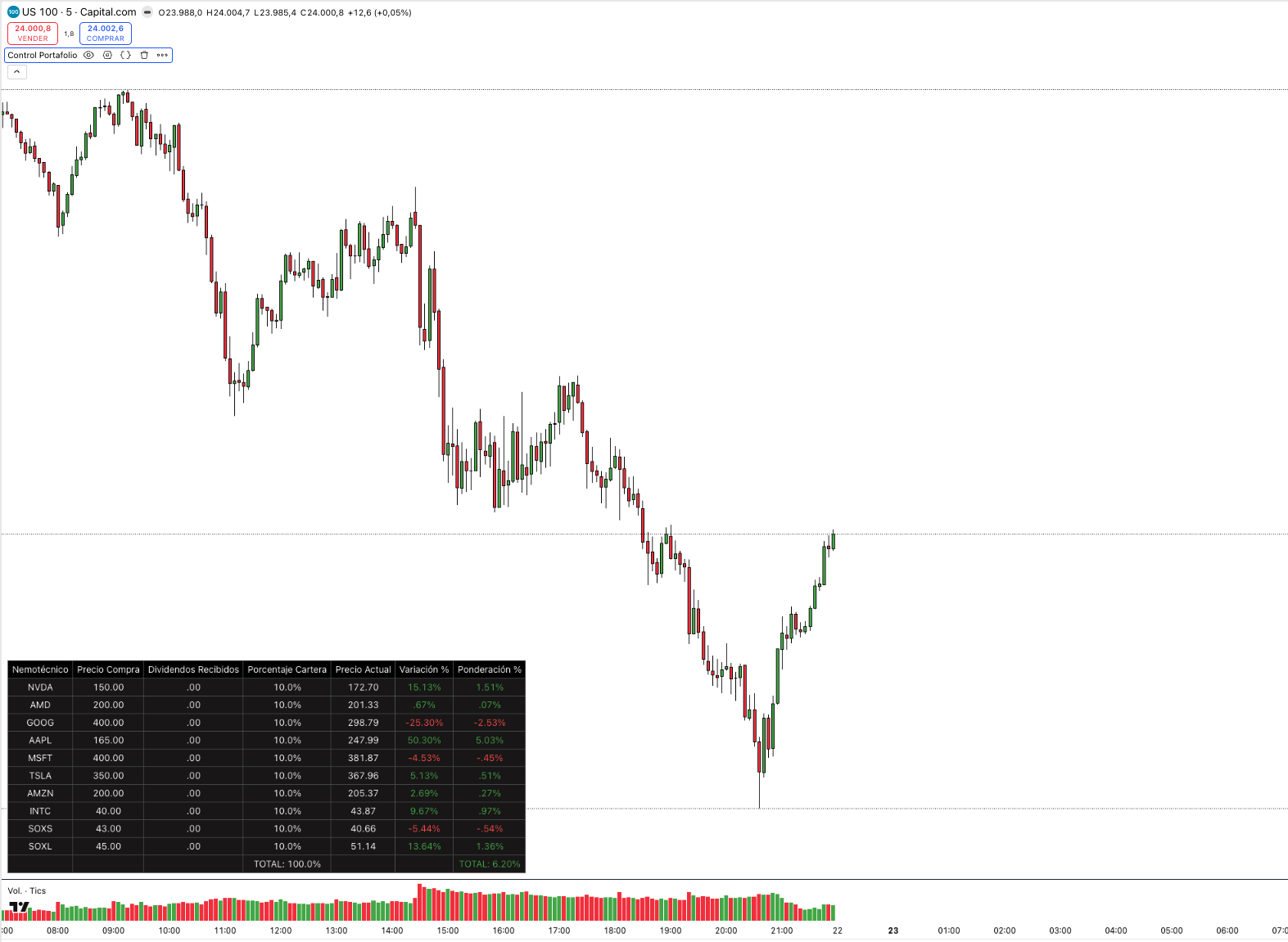
A script focused on portfolio tracking inside TradingView, so you do not need to rely on external spreadsheets and can keep a more direct view of portfolio evolution while the market is open.
- Simultaneous tracking of up to 10 assets
- Entry price and dividends input per position
- Custom weighting by asset
- Real-time percentage performance updates
- Direct use inside the usual TradingView environment
Compatibility
Built to get more out of the free TradingView environment.
The logic behind these scripts is designed to concentrate functions, keep practical value and avoid forcing the trader to upgrade just to stack more indicators.
The scripts are configured to maximize performance within the usual TradingView restrictions, especially on free accounts. The advantage is not only compatibility, but also how the logic is distributed to preserve operational value with fewer slots.
This makes it possible to combine technical structure, alerts, tracking and levels within a more compact architecture, keeping the chart cleaner and the workflow more efficient.
15+
Functions integrated into a single slot inside the Multi-Indicator.
10
Simultaneous assets available inside the Portfolio script.
4
Scripts included under the same subscription access.
Frequently asked questions
The essentials on compatibility, access and script usage.
These answers summarize the main points to know before activating the indicators inside TradingView.
Are they compatible with free TradingView accounts?
Yes. All scripts are prepared to work on free accounts. The Multi-Indicator is especially built to reduce slot limitations by concentrating more than 15 functions into one space.
What are the daily Gamma keys in the Multi-Indicator?
They are keys generated from Gamma levels for QQQ, SPY, SPX and NDX. They are published in the web dashboard and app; when pasted into the Multi-Indicator settings, the script automatically plots those levels on the chart.
Do the keys update automatically inside TradingView?
No. This is not a direct integration, because TradingView does not allow the indicator to receive this external data automatically. GEXfocus updates the keys 3 times per day during spot market hours; then you need to copy the current key from the web dashboard or app and paste it manually into the indicator settings.
How do I access the scripts after subscribing?
Once the subscription is active, you need to enter your TradingView username in the GEXfocus app settings. Then you receive the confirmation email with access to the scripts.
How many scripts are included in the subscription?
Access includes Multi-Indicator, Dual Reversal, IRT Alert and GEXfocus Portfolio.
Do I need programming knowledge to use them?
No. There is no need to modify code or know Pine Script. The indicators are activated inside the usual TradingView environment and managed from the standard interface.
Access
One access to use all four indicators.
With any GEXfocus subscription you get access to the TradingView scripts and can manage it later from your usual account.