 GEXfocus
Connect GEXfocus to your assistant.
Query options data, gamma structure, flow, fundamentals and calendar data from ChatGPT, Claude, Grok or another compatible client.
Compatibility
ChatGPT, Claude, Grok and other clients compatible with remote MCP.
Connection
Guided OAuth for ChatGPT, Claude and Grok; an API key for remote MCP clients.
Requirement
Available only to subscribers with real-time options data.
What MCP is
Query GEXfocus from your assistant.
MCP connects compatible clients to the tools and data enabled in your GEXfocus account.
Once connected, you can query options structure, gamma, delta flow, fundamentals and calendar data from the client you choose.
MCP complements GEXfocus dashboards with focused queries; the platform retains its full analysis views and tools.
Connection
Use OAuth for ChatGPT, Claude and Grok. For other remote MCP clients, generate an API key from the dashboard.
Access
A real-time data subscription is required. Available tools respect the coverage of your account.
Intended use
MCP is intended for personal queries and analysis. It is not for bulk extraction, scraping, bots, data redistribution or unauthorized commercial automation.
Setup
Choose your AI and connect your account.
Follow the ChatGPT, Claude or Grok process to authorize GEXfocus. For other clients compatible with remote MCP, use the dashboard API key and the example above.
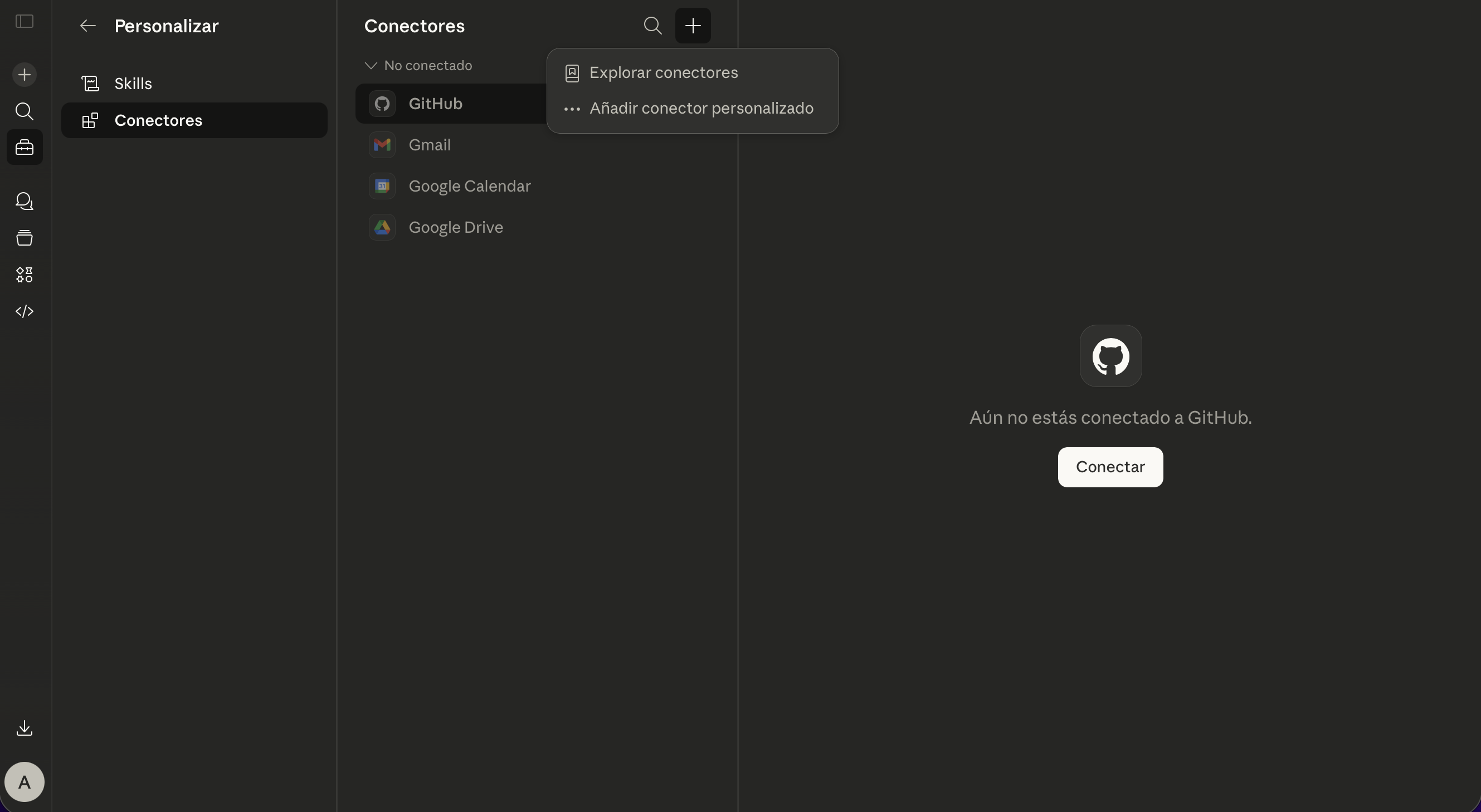
Go to Connectors in Claude
Settings · Connectors · Custom connector
Open Claude settings and go to the Connectors section. From there you can add a custom connector and prepare the GEXfocus integration.
- It is configured from Claude.ai
- You must choose the custom connector option
- The initial setup takes less than two minutes
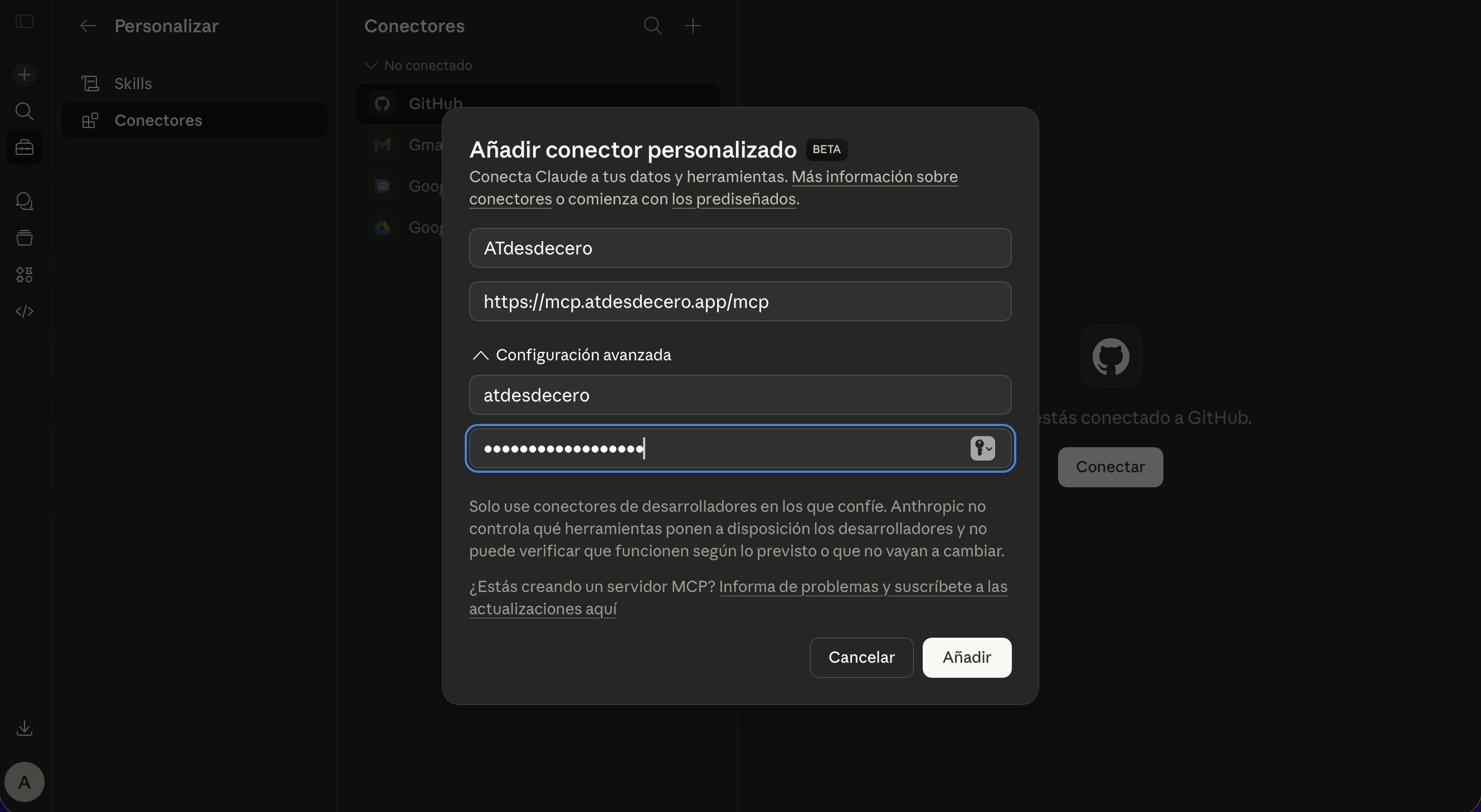
Enter the connector credentials
Name · URL · OAuth ID · OAuth Secret
Enter the connection details exactly as shown below. These values are public for the connector and are not yet your personal credentials.
Name
GEXfocus
URL
https://mcp.gexfocus.app/mcp
OAuth ID
atdesdecero
OAuth Secret
claude_atdesdecero
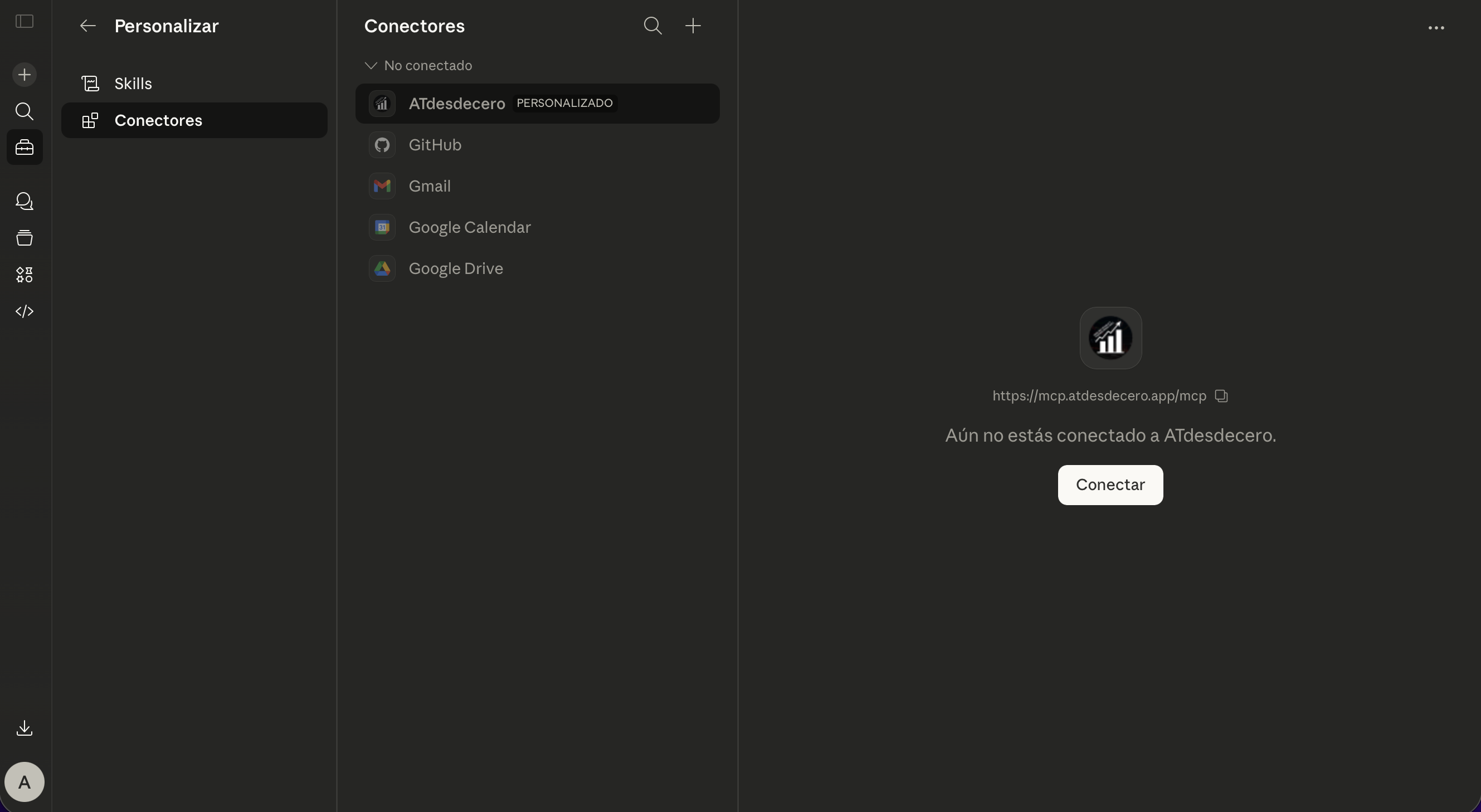
Authorize the connection with your account
Connect · Authorization · Active account
Press Connect. The GEXfocus authorization page will open in your browser so you can sign in, open and accept the privacy policy, terms of use and disclaimer, and approve access. Once completed, Claude will be able to use the integration with the coverage of your active plan.
- Your personal credentials are entered in GEXfocus, not in Claude
- The connection can be revoked later
- Once authorized, it is ready to use in your conversations
Done. From that moment on you can ask Claude for gamma structure, delta flow, heatmaps, calendars, macro data, fundamentals and any other information available in your GEXfocus account.
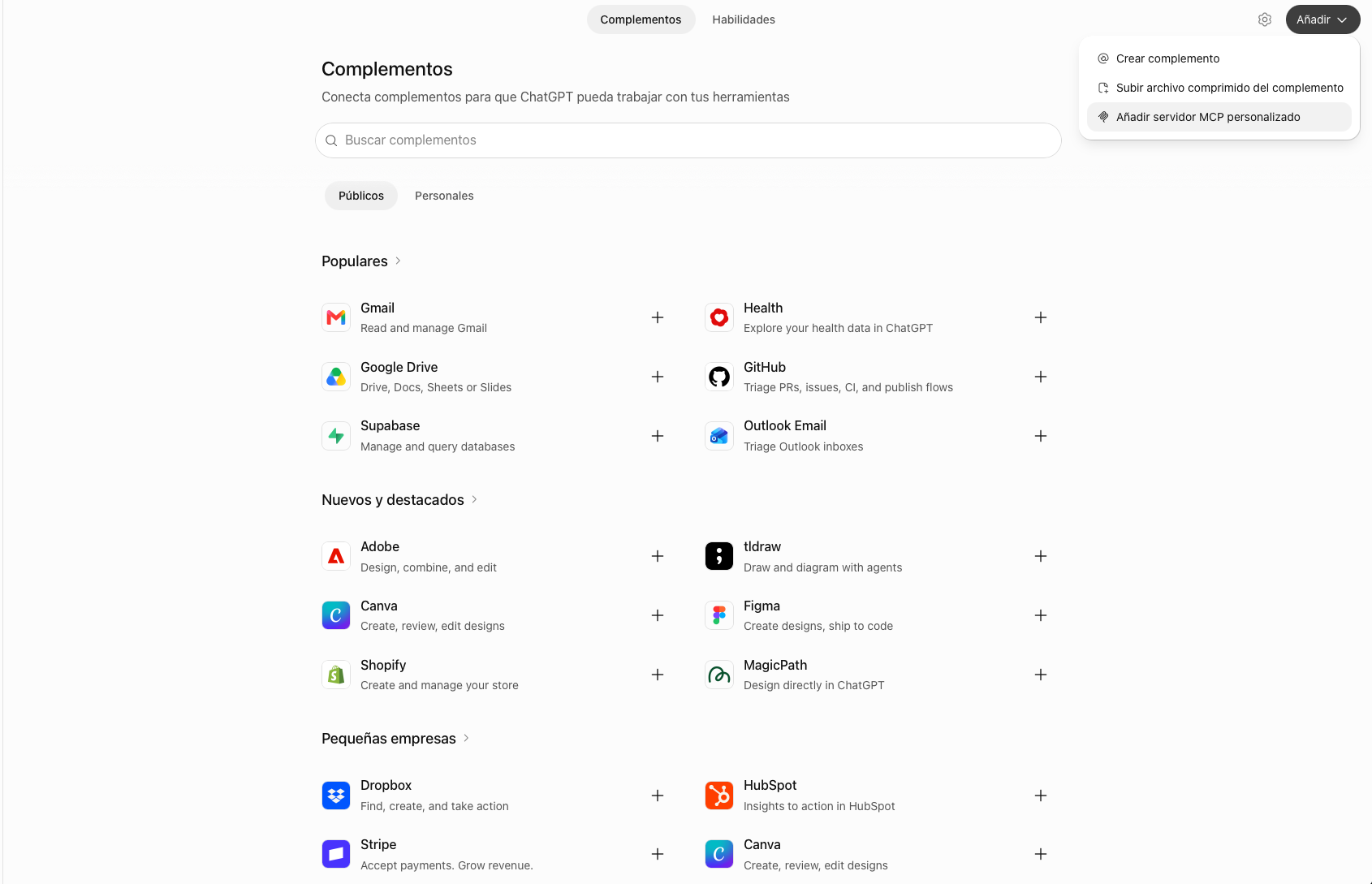
Add a custom MCP server
Plugins · Add · Custom MCP server
Before you start: enable Developer Mode in Settings → Apps → Advanced Settings. Then, in ChatGPT on the web, open Plugins, select Add in the upper-right corner, then choose Add custom MCP server.
- Custom MCP servers are configured from the web experience
- On Business, Enterprise or Edu workspaces, an administrator may need to enable access
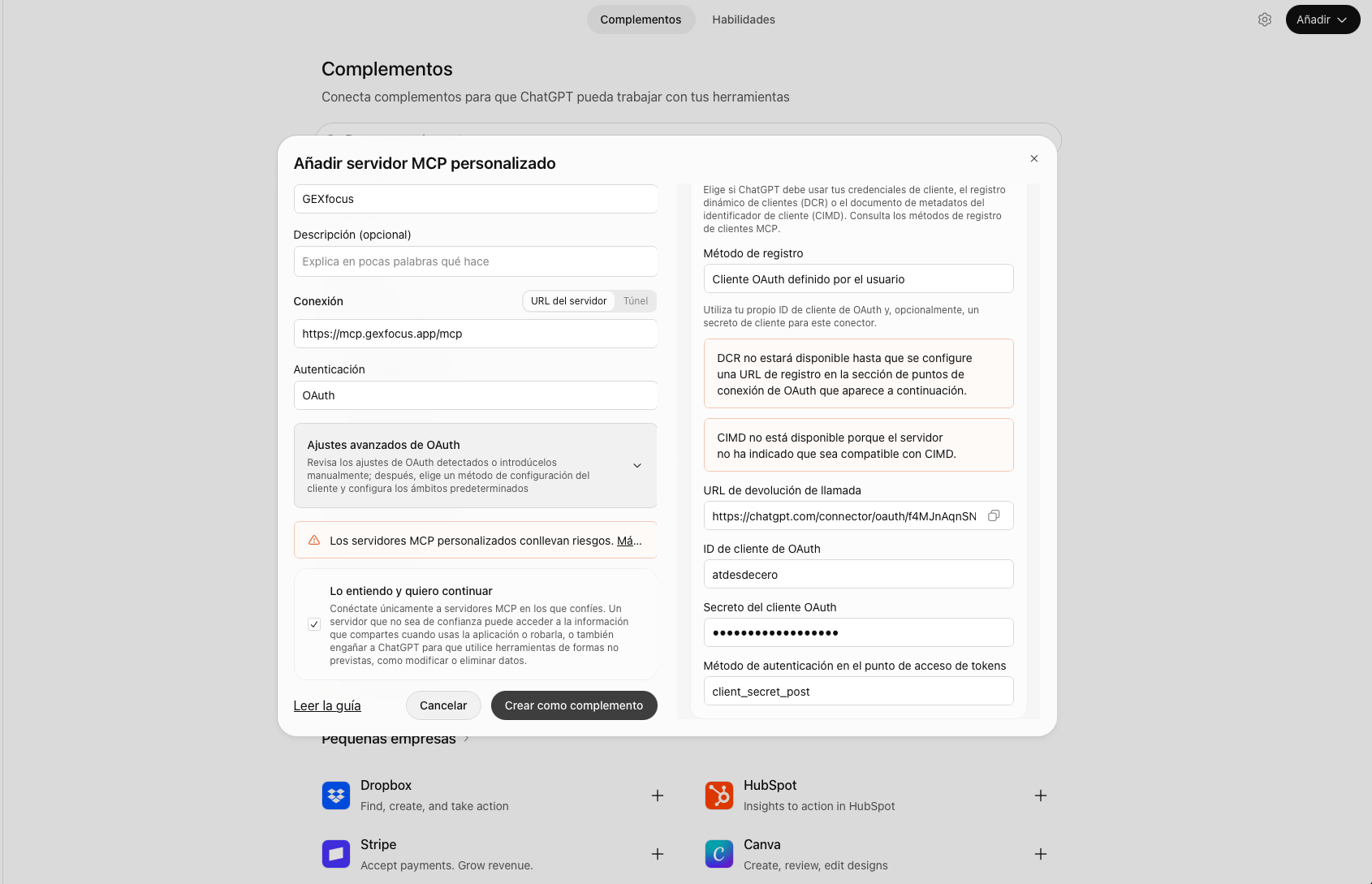
Configure GEXfocus and OAuth Advanced Settings
Name · URL · OAuth · OAuth Advanced Settings
Enter the GEXfocus details and select OAuth. Then open OAuth Advanced Settings to complete the client configuration.
Name
GEXfocus
URL
https://mcp.gexfocus.app/mcp
Authentication
OAuth
Client ID
atdesdecero
Client Secret
claude_atdesdecero
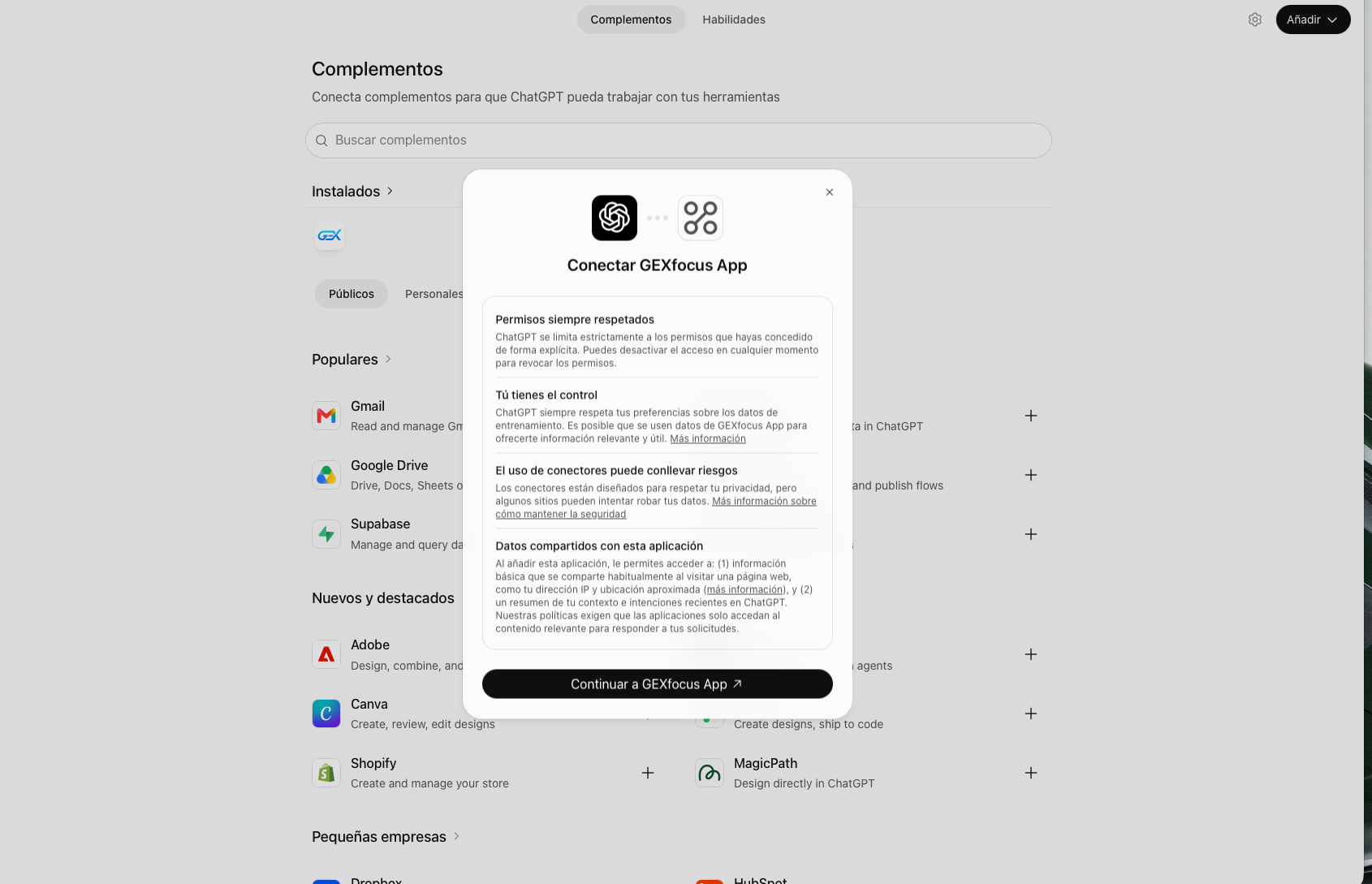
Authorize and use GEXfocus in ChatGPT
Create · Sign in · New chat
Review the security notice, create the connector and complete OAuth authorization by signing in with your GEXfocus account. Then open a new chat and select GEXfocus from the tools menu or mention it with @ to query your data.
- Your personal credentials are entered only on the GEXfocus authorization page
- The connector uses your active account coverage
- You can manage or disconnect the integration from Plugins
Done. You can now ask ChatGPT for gamma structure, delta flow, heatmaps, calendars, fundamentals and the data available in your GEXfocus account.
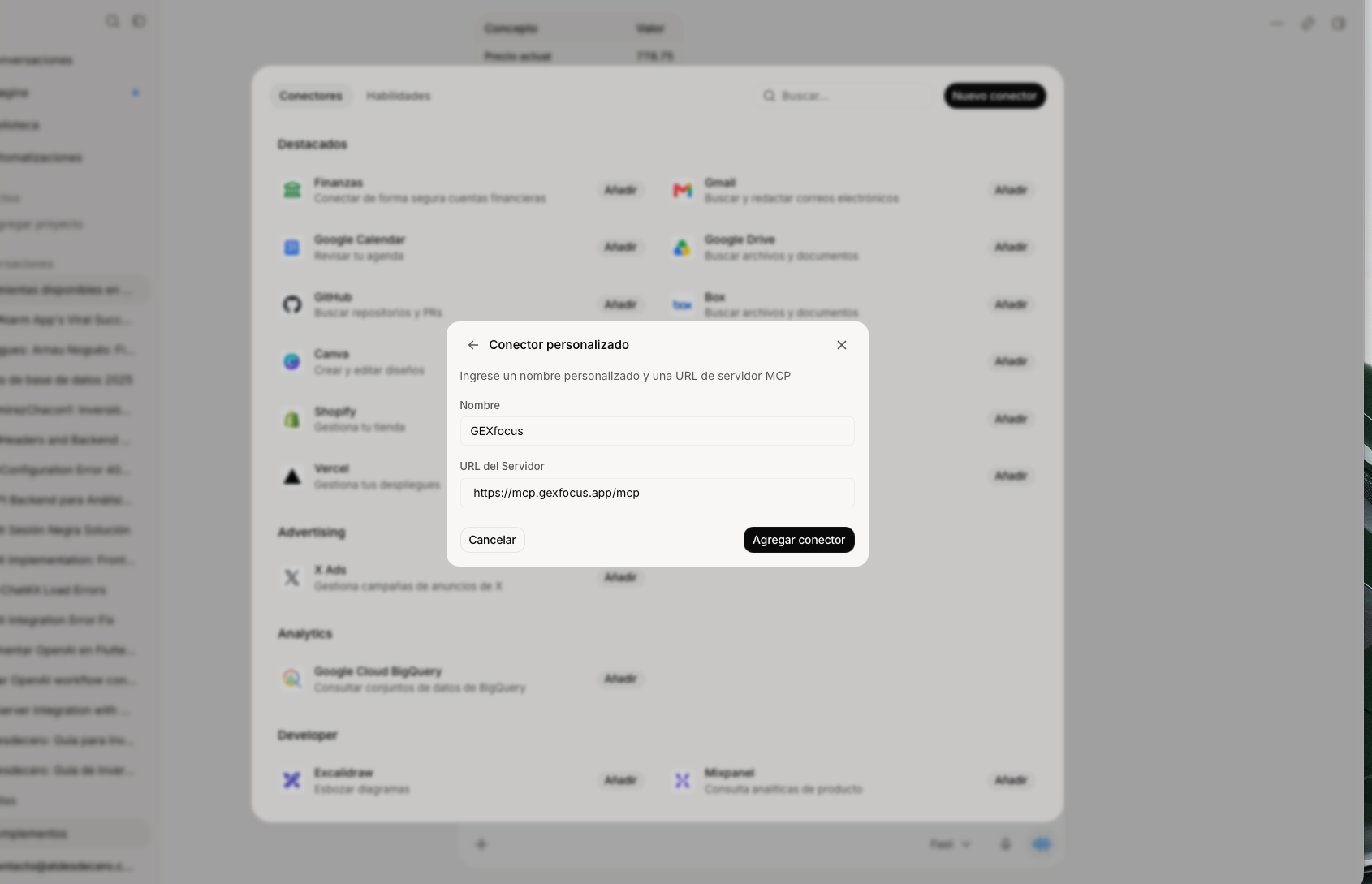
Open Plugins and create a connector
Lower-left corner · New connector · Custom connector
In Grok, go to Plugins in the lower-left corner. Select New Connector, then Add custom connector.
- Configuration takes place from the Grok interface
- Select the custom connector option to open the form
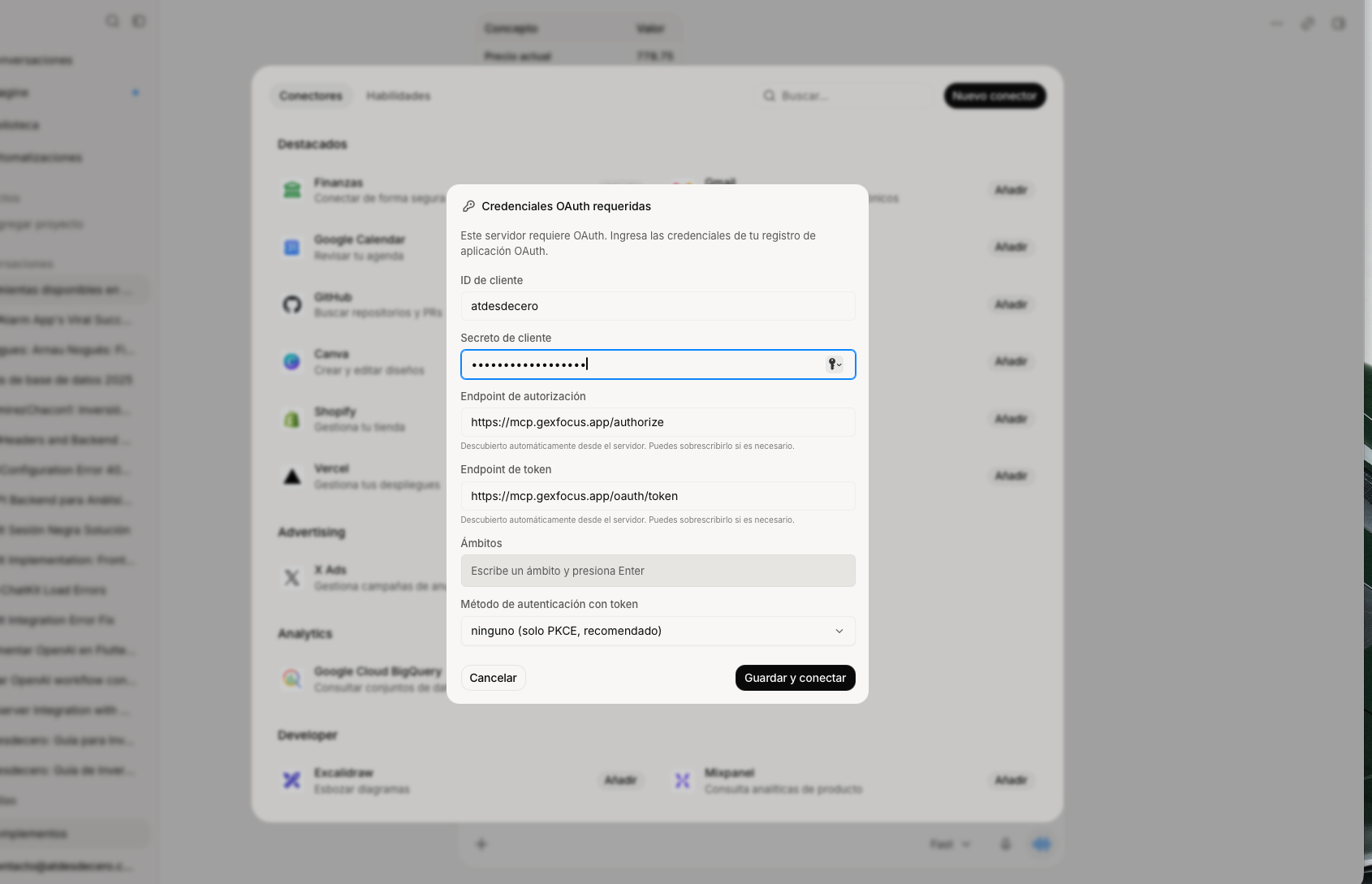
Configure OAuth and client credentials
Name · URL · OAuth · Save and connect
Enter the name and URL exactly as shown below. After selecting Add connector, Grok will open the OAuth settings: enter the client ID and secret, then select Save and connect.
Name
GEXfocus
URL
https://mcp.gexfocus.app/mcp
Client ID
atdesdecero
Client Secret
claude_atdesdecero
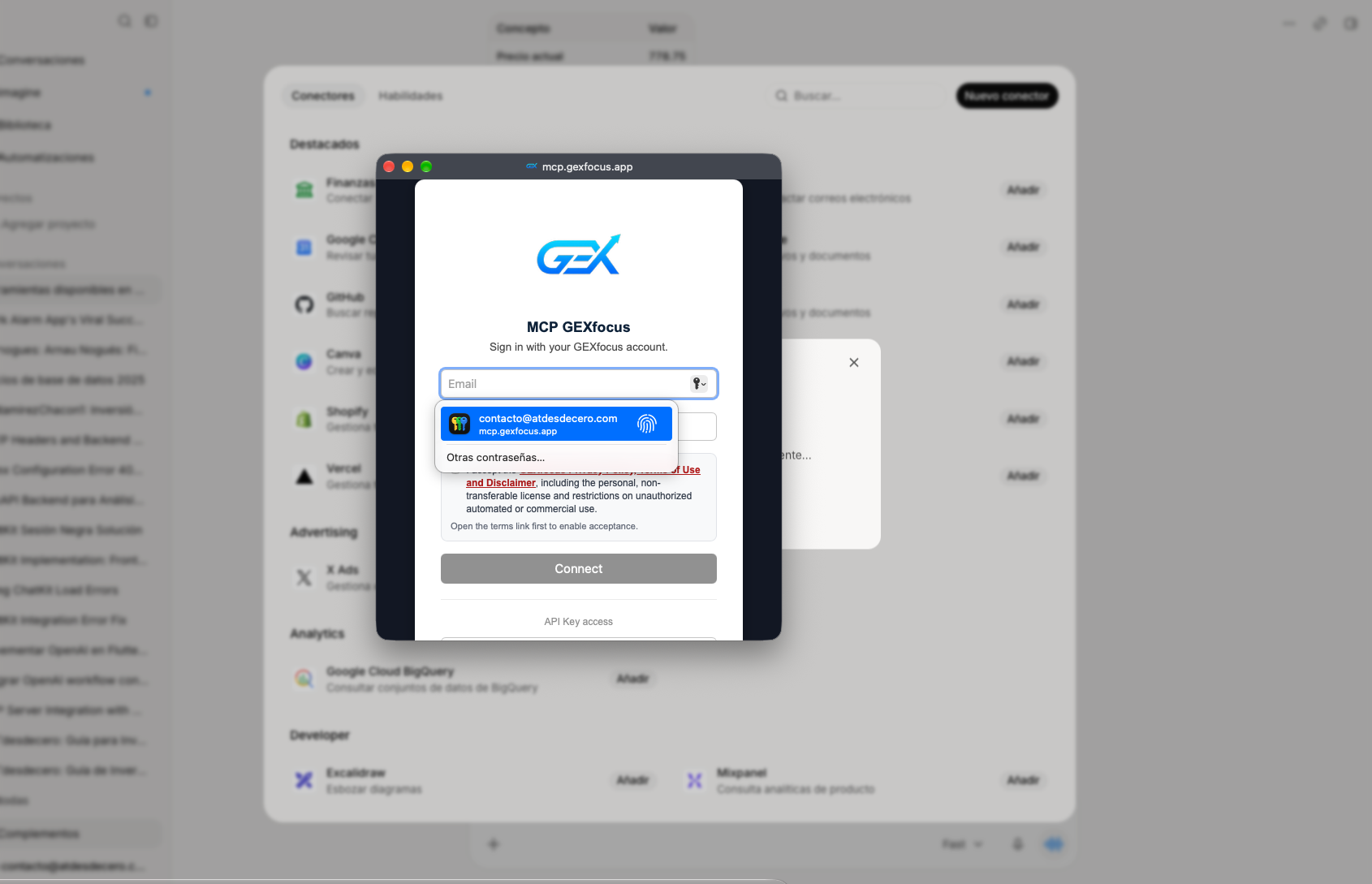
Sign in and authorize your account
Pop-up · GEXfocus credentials · Terms
A pop-up will open where you can sign in with your GEXfocus credentials and accept the terms.
- Your personal credentials are entered only in GEXfocus
- The connection uses your active account coverage
Done. After accepting the terms, the integration is ready and you can use GEXfocus tools directly in Grok.
Remote connection
You can also connect through npm remote with an API key.
For other remote MCP clients, generate your API key from the MCP dashboard and use it as a bearer token.
1. Generate your MCP API key
Open the MCP dashboard with your GEXfocus account. Available only to Real-time options data subscribers.
2. Use the remote URL
Use it with any client that supports remote MCP servers. Authorization travels as a bearer token and you can rotate it from the dashboard whenever needed.
npx -y mcp-remote https://mcp.gexfocus.app/mcp \
  --header "Authorization: Bearer YOUR_MCP_API_KEY"
What you can query
Intraday and swing options structure, heatmaps, U.S. market summary, insiders, earnings/dividends/IPOs calendars, ETF data, price targets, ratios, U.S. macro and your Trade Journal.
What you can query
Market data combined with AI reasoning.
With the integration active, ChatGPT, Claude or Grok can work with GEXfocus information in natural language and help you interpret structure, flow, heatmaps, fundamentals, insiders, calendars and macro context.
Gamma structure
Gamma flip, max gamma, put wall, call wall, total GEX and key market levels according to the coverage of your plan.
Delta flow
Accumulated Net Delta Flow, confirmation or divergence against price and intraday context when available.
PCR and ATM IV
Options market bias and implied volatility changes accessible directly from the conversation.
Insiders and Trades Journal
Query the latest insider movements by day and ticker, and review your personal journal with metrics, trade logging and position updates.
U.S. macro data
Economic calendar, macro events and U.S. market context integrated into the query workflow.
Fundamentals
Financial statements, ratios, margins, valuation and company analysis for the U.S. market according to your active plan.
Available tools
Query options, U.S. market data and your journal from one conversation.
These are the tools available inside the connector. Technical tool names appear in English, but you can ask for the data naturally in English or Spanish.
intraday_structure
Current intraday structure: gamma, delta, levels, PCR, expected move, NDF and session OHLC.
swing_structure
Options structure for future expirations using DTE, useful for analysis beyond the current session.
heatmaps
Strike and expiration matrices for gamma, vanna and charm.
us_market_summary
Compact summary of most active stocks, top gainers and top losers in the U.S. market.
us_earnings_calendar
U.S. earnings calendar with filters by symbol, day, limit and pagination.
us_dividends_calendar
U.S. dividends calendar with filters and pagination to keep responses controlled.
us_ipos_calendar
Upcoming U.S. IPOs with filters by symbol, date, limit and pagination.
us_insider_trades
Recent insider transactions by days or ticker, focused on relevant purchases and sales.
us_insider_trading_detail
Paginated insider trading search by ticker and transaction type.
us_etf_info
ETF information: AUM, expense ratio, NAV, holdings, sector exposure and general data.
us_price_target
Analyst consensus, target price, recommendations and estimated upside/downside for U.S. tickers.
us_ratios
Financial ratios, margins, valuation, liquidity, solvency, efficiency and key metrics.
us_macro
U.S. macro data: yield curve, spreads, economic calendar, inflation, employment, Fed and recession data.
journal_dashboard
Trade Journal metrics: win rate, profit factor, expectancy, drawdown, equity curve and performance by ticker.
journal_trades
Query trades registered in the journal with filters by ticker, market, broker and dates.
journal_create_trade
Register trades in the Trade Journal using broker, date, ticker, market, side, quantity, price and commissions.
journal_delete_trade
Delete your own journal trades after identifying the correct trade ID.
journal_brokers
List the brokers configured by the user to register or filter journal trades.
Frequently asked questions
The essentials on access, security and how MCP works.
These answers summarize the main points before you connect your account with an MCP-compatible client.
Which plan includes MCP integration?
MCP integration is available to GEXfocus subscribers with real-time data access. The tools and accessible data correspond to your active coverage inside the platform.
Which clients can I use?
You can use ChatGPT, Claude and Grok through their guided connection flows, as well as other remote MCP-compatible clients through an API key.
Is it safe to enter my credentials?
Yes. With OAuth, your personal credentials are entered only in GEXfocus authorization through your browser. With remote connection, you use a revocable API key generated from your MCP dashboard.
Can I revoke the connection whenever I want?
Yes. You can revoke the API key from the MCP dashboard or disconnect OAuth access from the client where you configured the integration.
Does it work with other MCP clients?
Yes, as long as the client supports remote MCP servers and authorization headers. Final compatibility may vary depending on the app and its configuration.
What actually changes between plans when using MCP?
Only real-time data subscribers can connect MCP. Within that subscription, data depth, tools and available functions correspond to the coverage enabled in your account.
Can I use MCP for automations?
MCP allows reasonable personal automations within human and individual usage, but it is not designed for bulk extraction, bots, data redistribution or unauthorized commercial use. For advanced automations or external integrations, contact GEXfocus.
Why are there query limits?
Limits protect service stability and prevent abusive automated usage. In normal use from a compatible AI client they should not affect the experience. If you need higher volume, the right path is the GEXfocus Trading API or a custom solution.
Access
Connect your account and use GEXfocus inside your AI.
With a real-time data subscription, you can connect through OAuth in ChatGPT, Claude or Grok, or through a remote API key in other MCP-compatible clients. Available tools correspond to your active coverage.